


Nexus - AI Video Generator
3.7349.00 Reviews
App Specs
- Version
- 3.3.0
- Updated On
- License
- Free
- Downloads
- 10,000,000+
- Developer
- DQL TechLab
- Categories
- Art & Design
- Platform
- Android
Screenshots





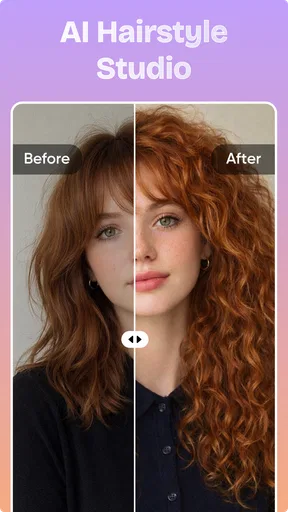

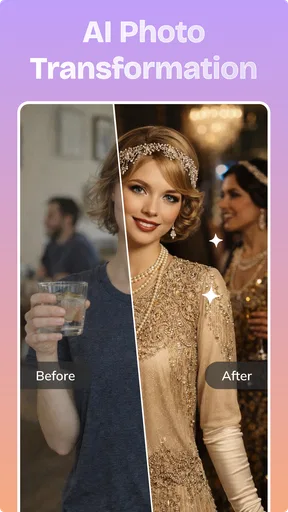
 Analysis by AppCompare
When I have a visual idea but no footage or finished design to work with, an AI generator can be a useful place to begin. Nexus is an AI-focused art and design app built for people who want to turn an idea into a shareable image or video without starting from a blank editing timeline. I like the appeal of that quick creative handoff: describe what you want, let the app generate a visual, then decide whether it is good enough to post or worth refining elsewhere. That makes it more approachable than a conventional video editor, but it also means the experience depends heavily on how much control and consistency its generation tools give you.
Fast visual experiments, with a trade-off in control
My main takeaway is that Nexus - AI Video Generator is best treated as a creative shortcut and idea generator, not as a complete replacement for a camera, illustration program, or full-featured editing suite. Its focus is on AI-generated videos and photos, so the natural use is to explore a visual concept quickly rather than carefully assemble every frame yourself. For social posts, mood pieces, and playful experiments, that can be a genuinely useful change of pace.
The app is in the Art & Design category, and DQL TechLab is its developer. That framing fits the strongest reason to try it: making visual content can feel less intimidating when the first step is an idea rather than a blank canvas. If you have a rough concept but limited time, a generator can help you see a possible direction before you commit to a more demanding workflow.
I would still keep expectations grounded. AI generation is not the same as choosing every detail by hand. A result can be attractive while missing the exact mood, composition, or subject you had in mind. That gap matters more for a client deliverable or a carefully branded campaign than it does for a casual post. The key trade-off is speed for predictability: Nexus is appealing when exploration matters more than precise control.
Where the quick workflow makes sense
Picture a small-business owner who needs a visual for a weekend promotion but has no finished footage. They could use Nexus to explore an image or video concept, decide which overall style feels right, and then take that direction into a separate tool for final text, cropping, or brand details. In that workflow, the app’s value is not that it necessarily produces a perfect finished ad; it is that it helps turn “I need something eye-catching” into a more concrete starting point.
A similar approach works for a creator planning a short social post. Rather than spending time polishing an idea that may not land, they can use a generated visual as a low-stakes draft. I recommend treating the first output as a sketch: check whether the subject reads clearly on a phone screen, whether the mood fits the message, and whether anything looks inconsistent before sharing it. That simple review step is especially useful when an image or clip will represent a real person, product, or event.
Another good use is visual brainstorming. If you are preparing a presentation, a personal project, or a themed post, generated imagery can help you compare different creative directions before settling on one. It is often easier to judge a visual idea when you can see a draft than when you are trying to imagine it from a sentence. Nexus makes the most sense here as one stop in a broader process, not necessarily the only app you will need.
Worth Reading Before You Choose

Flipboard Shows What News Apps Must Do Beyond the Feed

Switching to Android Auto Means Rethinking Your Driving Routine

Google Calendar Makes a Crowded Week Easier to Manage

Ludo King Makes the Most of the Minutes Between Plans

Baby Panda World Brings Quick Play to Modern Phones, but Its Game Library Feels Busy

ESPN’s Live Game View Makes Following Close Games Easier
What to check before you share
One practical habit is to write prompts around the purpose of the result, not just its subject. “A café” is a broad starting point; specifying the atmosphere and intended use gives you a clearer target to assess. I also find it helpful to change one part of an idea at a time when experimenting. If you alter the subject, style, and mood all at once, it becomes difficult to tell which change made the output better or worse.
For video, look at the whole clip rather than judging it from a single striking moment. A sequence that begins strongly may not stay coherent throughout, and a visual detail that seems harmless in a still frame can be more noticeable in motion. For photos, inspect important elements before using the result as a profile image, product illustration, or public-facing announcement. These checks do not require specialist editing skills; they simply help prevent a quick generation from becoming a careless post.
It is also worth deciding in advance how much finishing work you are willing to do. If you need exact lettering, consistent product details, or a tightly controlled layout, a dedicated design app may be the better place to complete the job. Generative tools can help establish a look, while conventional editors are usually better suited to precise placement and repeatable adjustments. Using both for what they do best is often more sensible than expecting one app to cover every stage.
Who is likely to enjoy it
I would point Nexus toward curious beginners, social creators, and anyone who enjoys testing visual ideas without investing in a complicated editing setup. It is also a reasonable option for people who want a quick creative prompt when they feel stuck. The app’s Everyone content rating makes it broadly positioned, though a general audience label is not a substitute for checking whether a particular generated result is suitable for its intended viewers.
Someone who already knows exactly how a finished video should look may find the generation-led approach less satisfying. The same goes for designers who need dependable control over typography, layers, or detailed composition. If your work depends on a consistent visual identity across many assets, a traditional design workflow—or a mix of generation and manual editing—will likely be more dependable than relying on fresh AI outputs alone.
I would also hesitate to recommend it as the sole tool for a time-sensitive professional job. When there is no room to revise an unexpected result, the convenience of generation can turn into extra work. A creator who needs predictable exports and fine control should compare it with a conventional editor before committing to a project. Nexus is more compelling when you can experiment, reject a draft, and try another direction without risking an important deadline.
Costs, compatibility, and what the numbers suggest
The app is free to install, but it includes in-app purchases priced from $9.99 to $89.99 per item. That broad range is a reason to look carefully at the purchase details before paying, especially if you are only testing whether AI-generated visuals suit your workflow. I would begin with the free experience, identify a specific limitation you need to overcome, and only then decide whether a paid option is worthwhile. A purchase makes more sense when you have a recurring use for the app than when you are simply curious about one experiment.
Nexus has an average rating of 3.4 from around 5,100 ratings, with about 176 written reviews. I read that as a mixed reception rather than a clear signal that it will work equally well for everyone. The app has passed five million installs, which shows substantial reach, but popularity alone does not tell you whether its creative style or workflow will match your needs. The most useful test is still whether you can get an output you would actually use.
It was released on March 24, 2026, and the current version is 3.3.0. It requires Android 8.0 or later, so older devices may not be compatible. Those details matter if you are considering installing it on a secondary or older phone, or if you want to make sure you can try it before planning a project around it.
How it compares with familiar creative tools
Compared with a conventional photo editor, Nexus is better suited to generating a starting visual than making exact, careful corrections to an existing one. Compared with a full video editor, its appeal is the creative leap from an idea toward a generated clip, not necessarily the depth of a traditional timeline workflow. Those are different jobs, so the better choice depends on whether you want the app to invent material or help you refine material you already have.
For a polished brand post, I would use a generation app to explore possible imagery and then move to a familiar editor for exact text, sizing, and final checks. For a personal experiment, I might stay in Nexus longer because the point is to see what an idea becomes, not to reproduce a design specification. That distinction is the most useful way to judge the app: it is a creative starting point for people who value quick exploration, while precision-first users should keep a manual editor close at hand.
A simple way to decide whether it fits
Before building a regular workflow around an AI visual app, I would test it with a small task that has a clear pass-or-fail purpose. For example, make a draft image for a personal post and ask whether it communicates the intended mood without needing several rounds of repair. This is more revealing than trying an abstract prompt with no practical use in mind: it shows whether the generated look is useful to you, and whether the amount of review feels reasonable.
That test also helps answer whether the free starting point is enough. If you are only curious, one exploratory session may tell you what you need without turning the app into a regular expense. If you expect to make visual drafts repeatedly, judge any purchase against that recurring need rather than the excitement of a single result. I would not pay simply because a generation looks impressive; I would pay only if the available option solves a specific bottleneck in the way I create.
For everyday creators, the practical question is not just whether the app can make an appealing picture or clip, but whether the result fits the destination. A visual intended for a quick story can tolerate a more experimental finish than an image that represents a shop, community event, or personal announcement. Keeping that distinction in mind helps me choose what to generate, what to revise elsewhere, and what not to publish at all.
My verdict is positive but selective. Nexus offers an inviting route into AI-assisted visual creation, and I can see it helping a casual creator move past the blank-page problem or produce a draft worth developing. I would not assume every generated result is ready to publish, and I would be cautious about paying before understanding what the purchase offers for my own needs. If you enjoy experimenting and are comfortable reviewing and refining what the app creates, it is worth trying; if you need consistent, exact control from the first step, a conventional design or editing app is likely the better fit.
Pros
- Turns text prompts into short videos with minimal editing.
- AI generation makes it easy to explore visual ideas quickly.
- Useful for creating social media clips and concept previews.
- No filming equipment or video-editing experience is needed.
- Generated visuals can help bring abstract prompts to life.
Cons
- Results may not match the prompt precisely.
- Video generation can take time
- especially during busy periods.
- Free usage may be limited by credits or generation caps.
- Fine details and movement can look inconsistent in some clips.
- AI-generated videos may need extra editing before publication.
FAQs for Nexus - AI Video Generator
What is Nexus - AI Video Generator?
Nexus - AI Video Generator is an app designed to create videos with the help of artificial intelligence. Depending on the features available in your version, you may be able to turn written prompts, images, or other inputs into generated clips. Check the app’s current description and examples before downloading, since supported creation tools and results can vary by version, device, and region.
How do you create a video with Nexus?
Typically, you choose an available creation mode, provide a prompt or other supported input, and let the app generate a clip. Clear descriptions of the subject, setting, movement, and visual style can help communicate what you want. Generation may take time, and you may need to revise your prompt or try again if the result does not match your expectations.
Is Nexus - AI Video Generator free to use?
The app may be free to download while limiting how many videos you can create without payment. Some AI tools use credits, subscriptions, or in-app purchases for additional generations, faster processing, or access to particular features. Review the store listing and the pricing information inside the app before starting a purchase, and check whether any subscription renews automatically.
What happens to the prompts, images, or videos I submit?
AI video apps may process submitted prompts and media on remote servers, so consider the privacy implications before uploading personal, sensitive, or copyrighted material. Read Nexus’s privacy policy to learn what information it collects, how inputs and generated videos are stored, and whether they may be used to improve services. Avoid sharing content you do not have permission to use.
Can I use Nexus-generated videos commercially, and what devices does it support?
Commercial rights can depend on Nexus’s terms, your plan, the source material, and the rules that apply where you live; do not assume every generated clip is cleared for business use. Check the current terms before publishing or monetizing a video. Also confirm the app’s store page for supported operating systems and device requirements, since availability can vary.


